Getting and editing a track recorded on Garmin Connect
A recorded activity isn't always perfect as it stands. Here's how to get hold of it and fix what needs fixing, with no intermediate converter.
Exporting the activity from Garmin Connect
From an activity page on Garmin Connect, the export menu offers several formats — including FIT, the device's native format, which keeps the most original data (altitude, heart rate, cadence, depending on the sensors used).
Why FIT keeps more data than GPX
The more universal GPX format mainly keeps position, altitude and time; depending on the export, sensor data is reduced or missing. FIT, specific to the Garmin ecosystem, also carries everything the sensors recorded — heart rate, cadence, power depending on your setup. Exporting straight to GPX from Garmin Connect before editing means losing this data from the start, even though it can still be useful: an average heart rate, for instance, helps recalibrate an effort estimate for a similar outing next time.
Importing the FIT file with no prior conversion
The FIT file loads directly, with no conversion to GPX beforehand. That's a useful difference: converting a FIT to GPX with a third-party tool before you can edit it wastes time and sometimes data; direct import avoids both.
FIT is read natively, on the same footing as GPX, TCX and KML. No intermediate conversion is needed before you start editing.
What usually needs fixing after a Garmin import
- Altitude, when the barometer has drifted mid-outing — a profile that looks shifted by several dozen metres compared with what the terrain actually felt like.
- Stray points caused by a lost signal under a bridge or dense tree cover, and the clusters of points recorded during breaks that inflate the distance: the "Clean up" tool finds them and removes them, with a preview before you confirm.
- File size, for a multi-hour outing that's built up tens of thousands of points — useful if the file needs to go back onto an entry-level device with a point limit.
That last point is covered in the guide on reducing an oversized GPX file. Older-generation Edge models are particularly affected: a per-file point limit, often missing from the spec sheet in-store, usually only comes to light when loading fails.
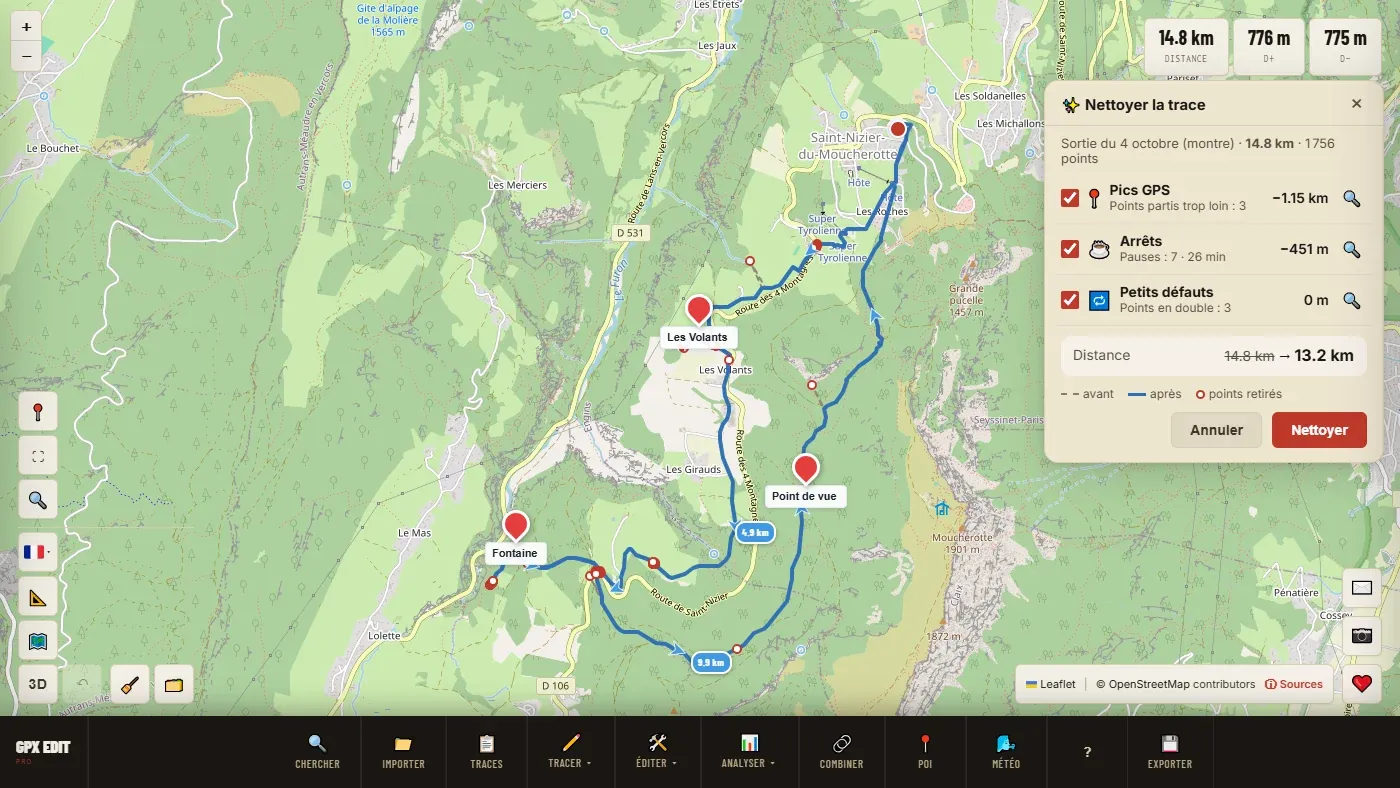
📖 Step by step in the manual: Import a FIT file · Clean up · Correct elevation · Simplify
Re-exporting to another format or device
Once the fixes are done, the file re-exports to standard GPX, compatible with most third-party platforms and devices — Wahoo, Suunto, Coros, Polar, Strava, Komoot. Handy for sharing a Garmin-recorded outing with someone on a different ecosystem, or archiving the activity in a more universal format than proprietary FIT.
Ready to try it on your own track?
Open the GPX editor for free →